Pixel Weather Reports: What You Share With Google
Summary
Pixel Weather reports let users flag conditions that do not match what they can see outside.
The feature is useful feedback, but it is not a promise that Google will immediately change a forecast. As of November 23, 2026, the clearest distinction for users is between reporting an observation and correcting a location or notification problem.
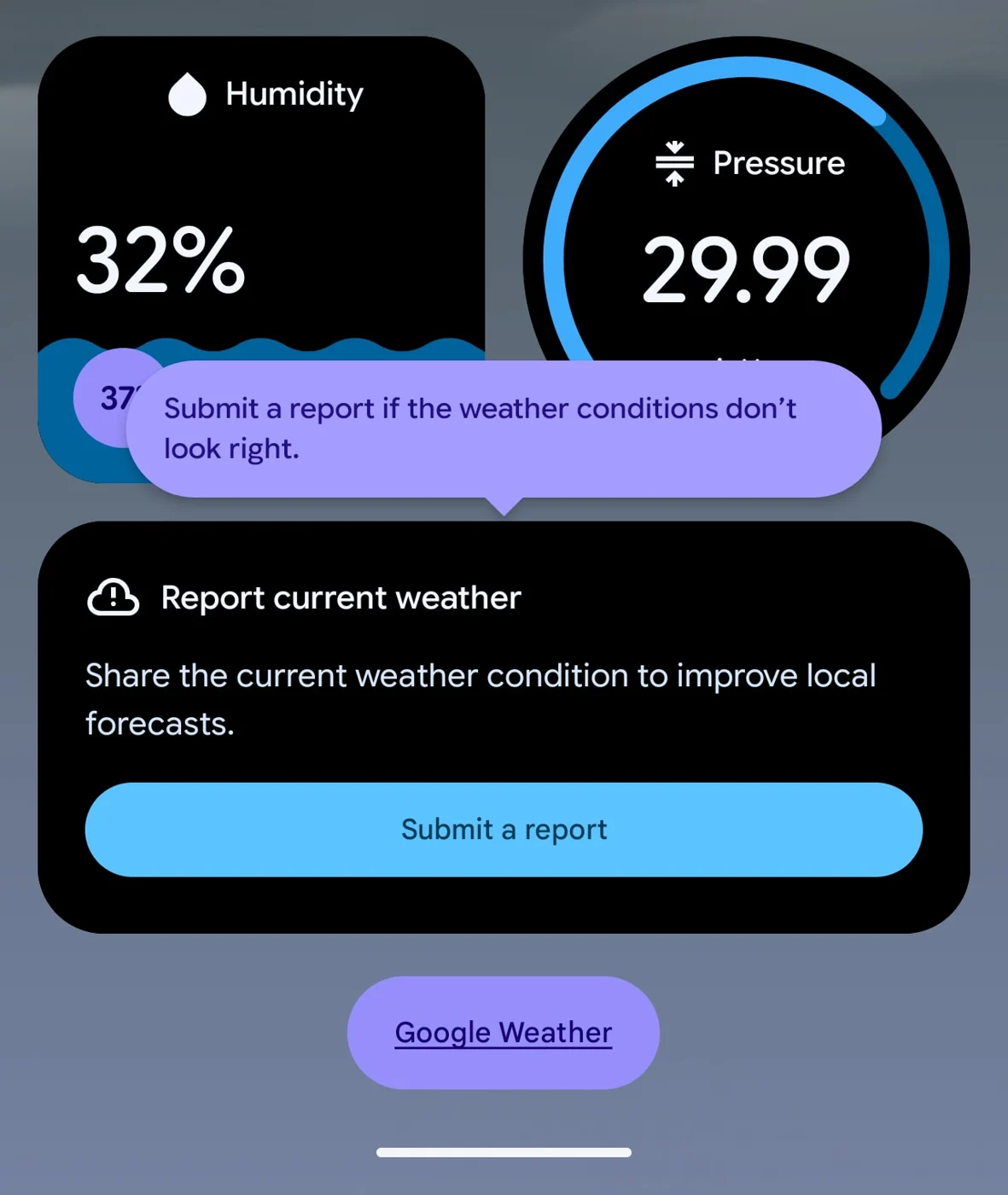
Featured image: Google Pixel Weather interface; screenshots via 9to5Google.
What Pixel Weather reports actually collect
9to5Google reported the rollout on November 22, identifying Pixel Weather version 1.1.20261012.x. Its screenshots show a Report current weather card at the bottom of the current-location page.
The report sheet separates temperature feedback from weather conditions. Temperature choices are Seems accurate, Warmer and Colder. Conditions include cloudy, clear, rain showers, sleet or hail, snow showers, strong thunderstorms and low visibility.
These are observations, not a field for entering a replacement forecast or a precise thermometer reading.
Check the location before submitting
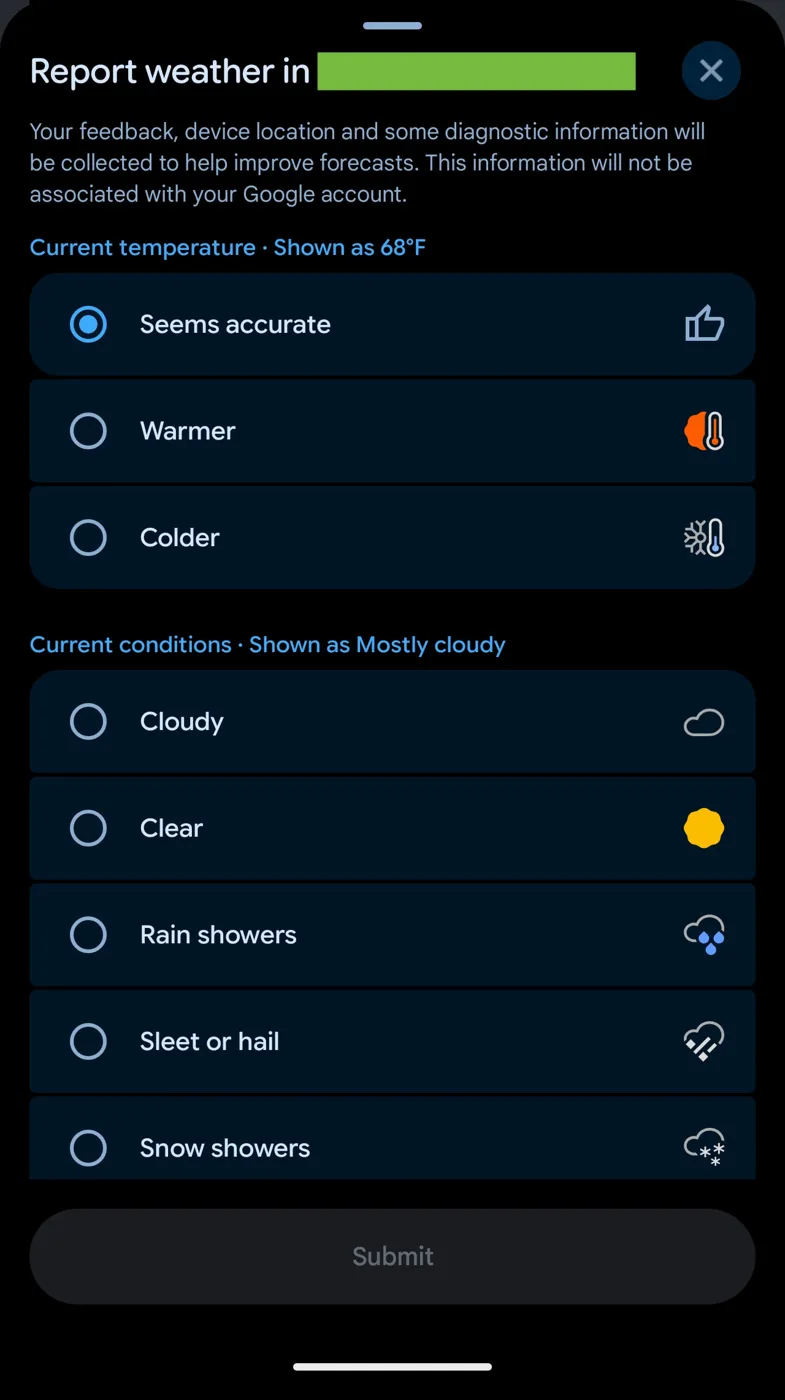
Start by opening Pixel Weather and checking that you are viewing your current location rather than a saved city.
If the report card is available, open Submit a report and select the choices that match your observation. Do not assume a card on your current-location page means every saved city has the same reporting option. Google’s Pixel Weather help page explains how to manage saved locations and recommends enabling location permission for more accurate local information.
That is a different action from sending a weather report.
If the app is showing the wrong town, checking location access addresses the mismatch more directly than repeatedly reporting that the weather is wrong.
Understand the privacy notice
The notice reproduced in the reporting screen says feedback, device location and some diagnostic information are collected to help improve forecasts.
It also says that information will not be associated with the user’s Google account. Both parts matter: not associated with an account does not mean no location information is collected. Read the notice on your own device before submitting.
The available reporting does not establish a retention period or guarantee complete anonymity, so those should not be inferred.
A practical choice is to submit only when you are comfortable sharing the listed information for this purpose.
A useful observation is not a forecast override
Consider a hypothetical situation: the app shows clear conditions but rain is falling where you are standing. Reporting rain showers communicates a local mismatch.
It does not establish how quickly the system uses that report, whether a particular forecast will change, or whether other users nearby will see a correction. Neither the cited rollout report nor the reviewed help page supplies a response-time commitment. There is also a difference between conditions at one spot and a prediction across a larger area.
For decisions involving dangerous weather, consult official warnings and local emergency guidance rather than treating a submitted observation as a safety update.
If the reporting card is missing
Check for a Pixel Weather update through the normal app update channel, reopen the app and inspect the current-location page.
The version identified in reporting is evidence of a rollout, not proof that every eligible device or region receives the feature simultaneously. Google’s general help page describes Pixel Weather availability on Pixel 6 and later devices, including Pixel Tablet, but it does not establish reporting eligibility for every one of those devices. Avoid sideloading an unknown package just to obtain the card. You can still check saved cities, permissions and notification settings without it.
Keep visual changes separate from warning meaning
The same update reportedly tones down the red background on weather-warning cards while retaining red warning text.
A less conspicuous background should not be interpreted as a lower-severity warning. Read the alert itself.
For users comparing recent Google app changes, the separate Gemini camera redesign is an interface change in another app, not a prerequisite for weather reporting.
The useful habit here is simple: verify the city, describe what you actually observe and keep forecast feedback separate from urgent safety decisions.