Milton iPad Dashboard: What Is Free and What Costs Extra?

Summary
Featured image: Developer screenshot: Deschutech LLC, via the App Store.
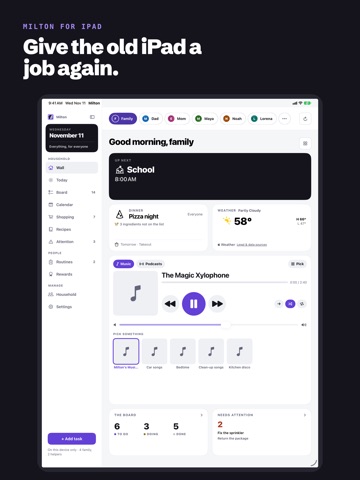
The Milton iPad dashboard gives an older tablet a practical second job: a shared screen for calendars, chores, meals and shopping. The important buying distinction is not whether the app can display those things. It is whether your household needs a single-device organizer or shared access across multiple devices and people.
As of November 15, 2026, the developer’s US App Store listing describes a free single-device offering and two one-time upgrades. An iPad running iPadOS 17 or later is required. This is a documentation-based guide, not a hands-on review.
What the free Milton iPad dashboard includes
The developer describes the free version as a complete organizer on one device, including every screen, the first family member and information entered by hand. That makes it a useful starting point before paying for synchronization or rearranging your household around a new system.
The dashboard uses a configurable grid. Users can draw spaces for tiles, choose what each space shows and move them around. The listed options include upcoming events, meals, shopping, weather, routines, clocks and a photo frame. However, a tile being available does not mean every associated service is free: the listing specifically puts weather on the wall iPad among the paid benefits.
A sensible initial layout is deliberately small: upcoming commitments, today’s jobs and the shopping list. This is a proposed workflow, not a tested performance claim. Starting with three jobs makes it easier to discover whether family members will actually consult the display before building a complicated wall of information.
The board is about completing work, not just displaying it
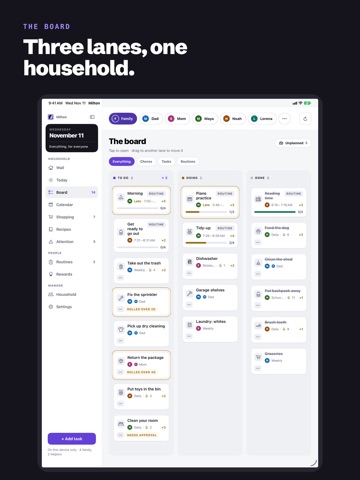
Milton’s board separates tasks into To do, Doing and Done. According to the developer, dated tasks appear when relevant and unfinished work rolls forward with a flag. Undated items remain in an unplanned area. Chores can repeat, rotate between children and require a parent’s sign-off.
That sign-off matters more than a decorative points counter. If rewards are involved, adults need to agree what completion means and who approves it. Milton lists balances, streaks and savings goals, but an app cannot resolve a household disagreement about whether a task was actually finished.
The developer screenshot above illustrates the three-lane board, rather than serving as evidence that we used the app. Readers who only need a shared list may find this structure useful; those already comfortable with another task manager should consider the cost of entering and maintaining information in a second place.
Individual versus Family: check who needs access
The US listing shows Milton Individual at $4.99 and Milton Family at $14.99, both one-time purchases. It also lists a $9.99 Upgrade to Family option. Prices and purchase availability can vary by storefront, so the checkout screen is the final reference.
Individual adds more people and helpers, calendar imports, synchronization across your devices, weather on the wall iPad and invitations to other people. Family extends the paid benefits to the purchaser’s Family Sharing group. The distinction is not simply “one person versus a family”: invitations are already listed under Individual, while Family concerns sharing the entitlement across Apple’s family group.
For a household, the purchasing question is therefore who needs the upgrade on their own Apple account. Check that against the actual Family Sharing arrangement before paying twice. Sync and invitations require iCloud; the free single-device use case should not be confused with a multi-device setup.
Privacy and a realistic old-iPad checklist
Deschutech says the app has no account system or developer servers that can see household data, stores data in the user’s iCloud and reads recipe and shopping-list photos on device. The App Store privacy label says data is not collected. These are developer disclosures, not an independent security audit or a guarantee about every device and cloud setting.
Before repurposing a tablet, confirm its iPadOS compatibility, battery condition, supported charging arrangement and safe placement. Avoid a damaged battery or a mount that blocks access to controls. Decide which calendars and family details should be visible to visitors as well as residents.
Compared with buying a dedicated smart display, Milton’s appeal is reuse and a clearly described one-time upgrade model. It is not proof of equivalent hardware integration. Our Apple HomeView security-update guide concerns a separate device and software stack. Choose based on the household task, not the assumption that two screens showing calendars are interchangeable.