1Password Security Incident: Vaults and Phishing Risk

Summary
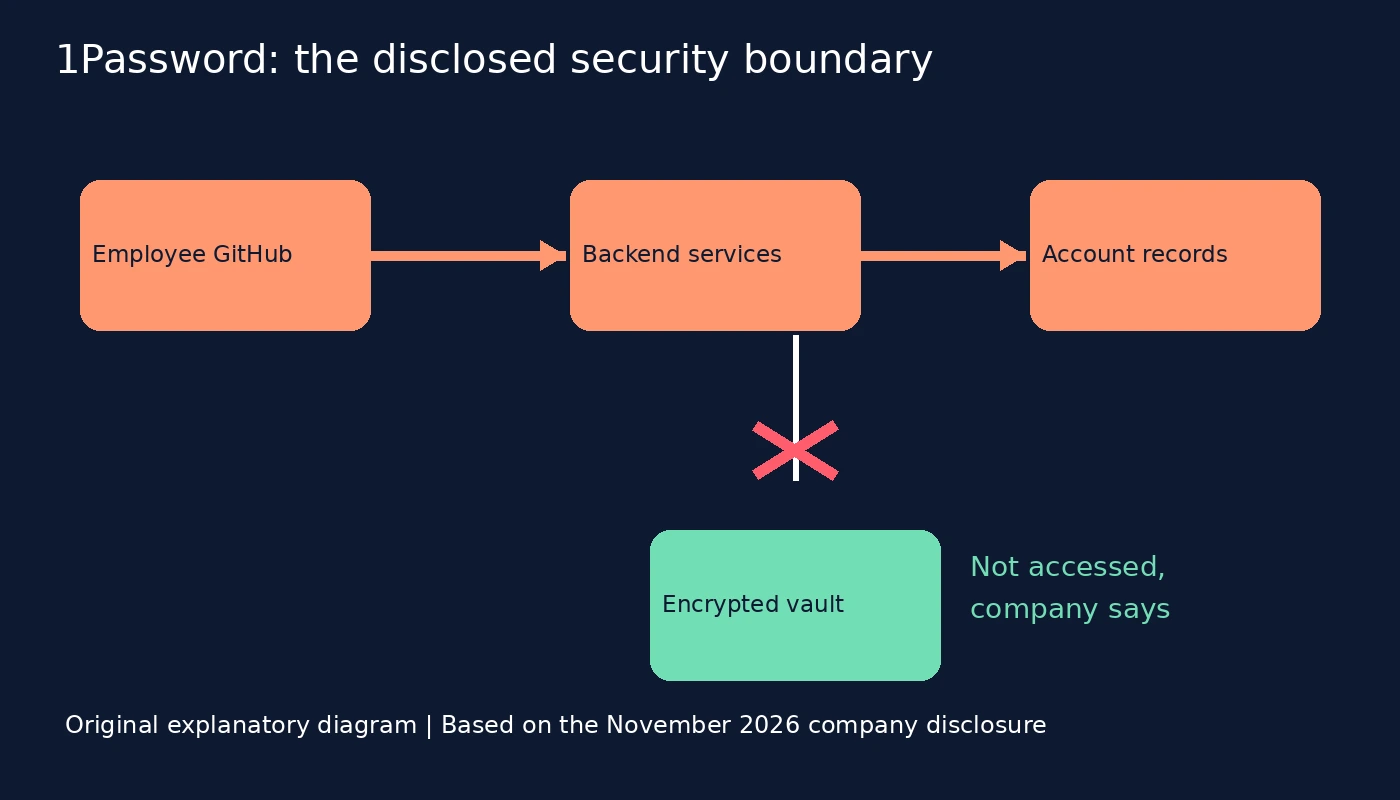
Original explanatory diagram: iDigitalNews, based on 1Password’s disclosure; not a private infrastructure map.
The 1Password security incident disclosed in November 2026 exposed account information for a subset of users, according to the company. Its statement says customer vault contents and the keys protecting them were not affected. That distinction is central: an account-data breach is serious without being evidence that attackers obtained the passwords stored inside vaults.
For customers, the immediate practical concern is convincing phishing built around names, email addresses, invitations and account recovery. The advice below is based on the company’s disclosure, not an independent forensic examination of its systems.
1Password security incident: what 1Password says the attacker accessed
In its official incident update, 1Password says it began investigating on November 19 after indications that an attacker accessed an employee’s corporate GitHub account. The attacker used that account to access source code and push malicious code to backend services. Those services downloaded customer administrative data.
The affected records included names and email addresses, account and user identifiers, account creation and last-sign-in times, public keys, Secure Remote Password protocol parameters and other non-secret internal metadata. The company also lists tokens in certain invitation, provisioning and recovery links. It has not provided an affected-customer count in the statement reviewed for this article.
The attacker copied code from private repositories and accessed the CI/CD system used to build and deploy software. 1Password says that infrastructure contained infrastructure-related secrets, and that potentially exposed internal credentials were rotated or revoked. These are company statements about scope and remediation; customers should continue to watch the maintained incident page for changes.
Why exposed tokens are not the same as vault keys
The company says a provisioning or recovery token cannot open an account by itself. Completing the relevant process also requires an SSO sign-in or a verification code sent to the registered email address. A small number of users with those processes underway were specifically notified, according to 1Password.
As a precaution, invitation and recovery codes were expanded from six numeric digits to ten alphanumeric characters. This strengthens the code against guessing. It does not mean an unsolicited request for a code is legitimate, or that customers should read codes out to someone who calls them.
1Password lists vaults and their items, vault-protection keys, account recovery keys, apps and browser extensions as unaffected. It also says it does not store the account password or Secret Key. The useful boundary is between administrative information about an account and the secrets needed to decrypt a vault. Treating those categories as interchangeable would exaggerate what the disclosure establishes.
How to handle a convincing recovery message
Consider a hypothetical email that uses your real name and says a recovery action is needed because of this incident. A correct name is not proof of authenticity: names and email addresses are among the exposed fields. An accurate reference to the breach is not proof either, because the incident is public.
Instead of using the message’s sign-in link, open the official app or type the known official website address yourself. 1Password says it will never contact you to ask for your account password or Secret Key. It says the Secret Key is only needed on the first sign-in on a new device or browser. Unexpected requests for either deserve particular scrutiny.
Do not send an account password, Secret Key or verification code in reply to an email or caller. If an invitation or recovery action is unexpected, check it through the official product or support channel rather than accepting the sender’s explanation. The company’s disclosure directs suspicious activity reports to its official support address. This workflow is a defensive interpretation of its guidance, not a claim that we tested an attack.
What administrators should check next
For an organization, first determine whether any notified users had provisioning or recovery operations underway. Use established internal communications to tell employees how to verify genuine IT requests. A real administrator’s name in a message should not bypass the normal approval path.
Separate the company’s internal credential rotation from customer action. The statement describes rotation of infrastructure credentials potentially exposed inside 1Password; it does not establish that every customer’s stored password has been stolen. Broad emergency password changes are not supported by the disclosed vault impact alone. If your own account shows unauthorized activity or you entered secrets into a suspicious site, that is a separate situation requiring account-specific assistance.
Independent reporting by 9to5Mac describes the same disclosure, but does not substitute for a completed outside forensic report. As of November 26, the strongest supported conclusion is narrower than either “nothing happened” or “all vaults leaked”: customer metadata was taken, while 1Password says vault secrets remained protected. The next useful evidence will be any updated scope, customer notifications or independently validated findings.
The broader issue of reducing backend exposure is distinct from vault encryption. Our report on temporary Linux vulnerability shields discusses another layer of defensive engineering, not a remediation prescribed for this incident.